
Your training in Safe Pathways happens through pathways, short sets of video lessons assigned by your church. This article shows you how to start a new pathway or pick up where you left off.
Steps to start or continue a pathway
- Go to Training. Select Training from the left-side menu.
- Find your pathway Scroll to "Your pathways." You'll see one or more pathway cards showing your current status and an action button
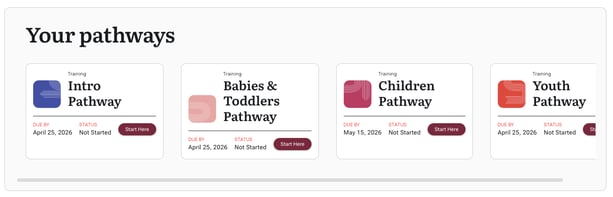
- Start or continue If the button says "Start Here", select it to begin. If it says "Continue", select it to resume where you left off.
- Work through the lessons Each pathway is made up of short video lessons, typically 2-4 minutes each. Watch the videos, then answer the quiz questions that follow.
- Check your progress. Return to Training at any time to see your updated status. When you finish, the card changes to "Completed" and your certificate appears in the Certificates section.
How the quiz works
The quiz requires 100% to pass, but if you get a question wrong, the platform links you back to the video section that covers that topic. Watch it again, then try the question once more.
💡 Annual renewals are easier
When your training comes up for renewal, you can jump straight to the quiz. You'll only need to review the parts you've forgotten.
Frequently asked questions
How long does a pathway take?
Most pathways take under 20 minutes. The intro pathway takes about 10 minutes.
Can I pause and come back later?
Yes. Your progress is saved. Select "Continue" when you return and you'll pick up where you left off.
I completed everything but my status still says "In Progress."
Refresh the page. If it persists after a minute or two, try signing out and back in.