
File naming conventions
Before uploading your policy to Safe Pathways, name the file clearly so you and your team can identify it at a glance, both in Safe Pathways and in your own file storage.
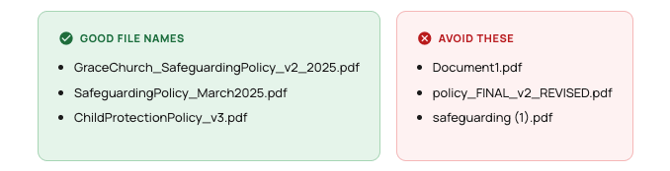
A good file name includes your church name (or abbreviation), the document type, and a version or date. This makes it easy to confirm you're looking at the right file and to track changes over time.
Versioning your policy
Use a consistent versioning system so you always know which version is current. Two common approaches work well:
Version numbers (v1, v2, v3...)
Simple and clear. Increment the version number each time the policy content changes in any meaningful way. A minor correction might be v1.1; a substantial rewrite warrants v2.
Date-based versioning (YYYY-MM or Month YYYY)
Useful if your church reviews the policy annually. For example: SafeguardingPolicy_2025-01.pdf for the January 2025 version. This makes it immediately clear how old a policy is without needing to look it up.
ℹ️ Keep a copy!
Keep a copy of every version you upload, stored somewhere accessible to church leadership. This gives you a historical record if a previous acknowledgement ever needs to be referenced.
When to update your policy in Safe Pathways
Upload a new version when:
- Your church has formally reviewed and revised the policy
- Legislation or denominational guidance has changed and your policy needs to reflect that
- You've added new procedures (e.g. a new reporting process or digital communication guidelines)
- The current policy contains an error that needs correcting
Frequently asked questions
What file format should I upload?
PDF is the recommended format for policy documents. It preserves formatting across all devices and can't be accidentally edited by volunteers viewing it.
Is there a file size limit?
Keep your policy document under 10 MB where possible. Most text-based PDF policies are well under this limit. If your file is very large, check whether it contains high-resolution images that could be compressed.
Can I remove a policy without replacing it?
Contact Safe Pathways support if you need to remove a policy document without uploading a replacement. Removing a policy without a replacement will affect the policy acknowledgement step in volunteer training.